Structure
Use a consistent, structured framework
Error messages should always do two things:
- Tell the user what happened (the problem)
Provide a clear, concise statement about the current state. This provides context for the user and builds trust.
- Tell the user how to fix it (the resolution)
Provide a direct, actionable path forward. An error message without guidance on how to resolve the problem is a dead end.
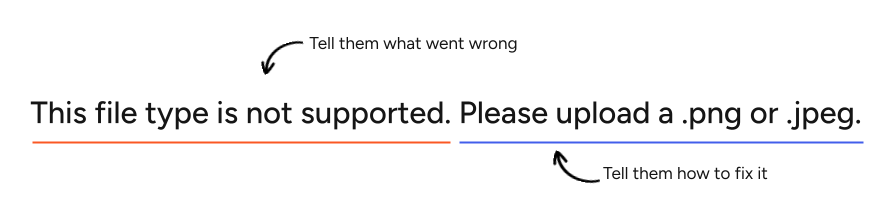
Example #1
In this example, the problem and resolution are explicitly stated. The first sentence tells us what’s wrong, and the second tells us what to do next. Each part is straightforward, and it’s a good go-to format to follow.
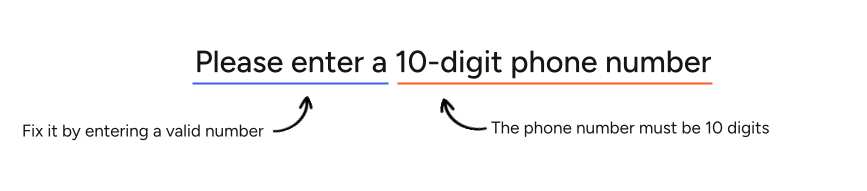
Example #2
In this example, the problem is expressed implicitly. By telling the user that the phone number needs to be 10 digits, we’re letting them know that what they entered didn’t follow that format. The solution remains explicit: they must enter the number to proceed.
Be concise and front-load important information
Aim for clarity and brevity, prioritizing critical information to enable users to understand the problem and unblock themselves as quickly as possible.
Don't rely solely on color to indicate an error
Copy must explicitly state the problem so screen readers and users with visual impairments don't have to rely on a red outline or icon to know something is wrong.
Grammar and mechanics
Use sentence case
It’s easier to read and helps people scan the content. Always capitalize proper nouns such as brand names (example: Gildan) or site areas/features (example: Brand Kit.) Never use all caps.
Remove unnecessary punctuation
Omit periods for errors with just one sentence or phrase.
In multi-sentence messages, use end punctuation for all sentences. Exception: when an error message ends with a text link, do not use end punctuation after the link.
Never use exclamation marks as they can imply a false sense of urgency or severity. An error message should never include a question, so do not use question marks either.
| Examples: |
|---|
| Please enter an email address |
| We’re having trouble loading this preview. Please refresh the page or try again later. |
Use consistent tenses for ongoing or completed issues
Use present tense for ongoing issues or states.
| Examples: |
|---|
| This file format is not supported |
| We’re having trouble loading this preview |
Use past tense to describe a distinct, completed event that caused a problem.
| Example: |
|---|
| We couldn’t save your address |
Do not use Latin abbreviations
Don't use Latin abbreviations like i.e. or e.g. to introduce examples.
| Instead of: | Use |
|---|---|
| Enter a 10-digit US number including the area code (e.g., 555-555-5555) | Enter a 10-digit US number with an area code (555-555-5555) |
Language, voice and tone
Do not use technical jargon or negative language
Never use technical backend terms such as: error codes, null, API, 404, timeout, syntax, database, invalid, failed, forbidden. Use plain language and avoid creating a false-sense of urgency.
Write meaningful CTAs
If the error message includes a button or link, the copy must clearly describe the action.
| Instead of: | Use: |
|---|---|
| Click here | Update billing information |
| OK | Return to cart |
Write for a Flesch reading ease score of 60–80 (US Grade 6-8 reading level)
Clear, simple phrasing is essential for minimizing mental effort and to ensure successful translation/localization.
Don’t blame the user
Avoid using pronouns like “you” or “your” in a way that implies fault. Instead, focus on neutral, solution-oriented language.
| Instead of: | Use: |
|---|---|
| You didn't select a date | Select a date |
Use “please” cautiously
Using "please" can undermine our authority and lead users to think a required next step is an optional suggestion. Use clear, direct imperative verbs instead.
| Instead of: | Use: |
|---|---|
| Please enter your first name | Enter your first name |
Use “sorry” cautiously
Saying "sorry" too often or in the wrong context can make the situation feel worse, especially if multiple apologies in a single session compound.
Take responsibility with words like “we,” “us” or “our”
When our systems fail, it's better to take responsibility using "we," than to say "sorry." Focus on the resolution rather than dwelling on the apology.
| Instead of: | Use: |
|---|---|
| We’re sorry, something went wrong. Please try again. | Something went wrong on our end. Refresh the page or try again |
Only apologize when we’re at fault
When an apology is necessary, keep it concise and focus on the resolution.
| Instead of: | Use: |
|---|---|
| This payment method is currently unavailable. We apologize for the inconvenience this may cause. | Sorry, this payment method is currently unavailable. Select a different payment method or try again later. |
Use “VistaPrint” when requesting access to third party platforms
Using the brand name provides better clarity in security contexts and aligns with the formal "App Name" displayed by third-party OAuth screens (like Google or Meta). Never use “we” when requesting access to third-party accounts.
| Instead of: | Use: |
|---|---|
| We need access to Google Drive | VistaPrint needs access to Google Drive |
