The Cimpress Experience Platform (CEP) is a shared UI platform that standardises components and layouts across brands, while still allowing for individual brand expression. SWAN enables brand expression through theming, where brand styling is applied by updating token values within a fixed token architecture.
Creating Themes
If you are creating a new theme, first reach out to the SWAN team via #help-swan on Slack, or designsystemproductteam@vista.com, so we can help you through the process. At a high-level, themes can be designed by anyone, but they need to be implemented by the SWAN team.
Themes are intended to support brand expression, not to distinguish alternative product types or marketing campaigns. For example, Studio is not a theme. It is a product within Vista that can be themed like any other UI, just as front-of-funnel UI can be themed to reflect a different brand. Holiday marketing campaigns are also not themes. Those should continue to be managed by the brand and creative teams through content.
Designing
Themes bring a brand’s visual identity into the UI through token overrides. While the exact decisions will vary by brand, a small set of token groups usually provides the strongest foundation. To design themes, it is important to have a decent understand of SWANs Token architecture.
We recommend starting with:
- Brand colors, using the
brand,accent, andsurfacetokens. See Color for more information. - Brand typography, by importing fonts and applying them to
font.familytokens, which then flow tofontSkins. See Typography for more information. - Brand shape language, using the border radius tokens for
action,input, andcontainer.
Together, these decisions establish the core character of a theme. From there, additional adjustments can be made as needed.
Themes also support modes, darkMode and compactMode, however precedence needs to be considered. See Modes for more information.
For an in-depth overview on creating themes, refer to the internal Theming Guidelines.
Publishing
Themes must be published by the SWAN team.
Using Themes
In Code
Themes are loaded via UBIK, picking the theme based on the appropriate tenant, ie vistaprint, national-pen, etc. SWAN does not support loading a brand theme in a production application outside of Ubik at this time.
See SwanProvider's brand prop for more details, including prototype app workarounds: React setup.
In Figma
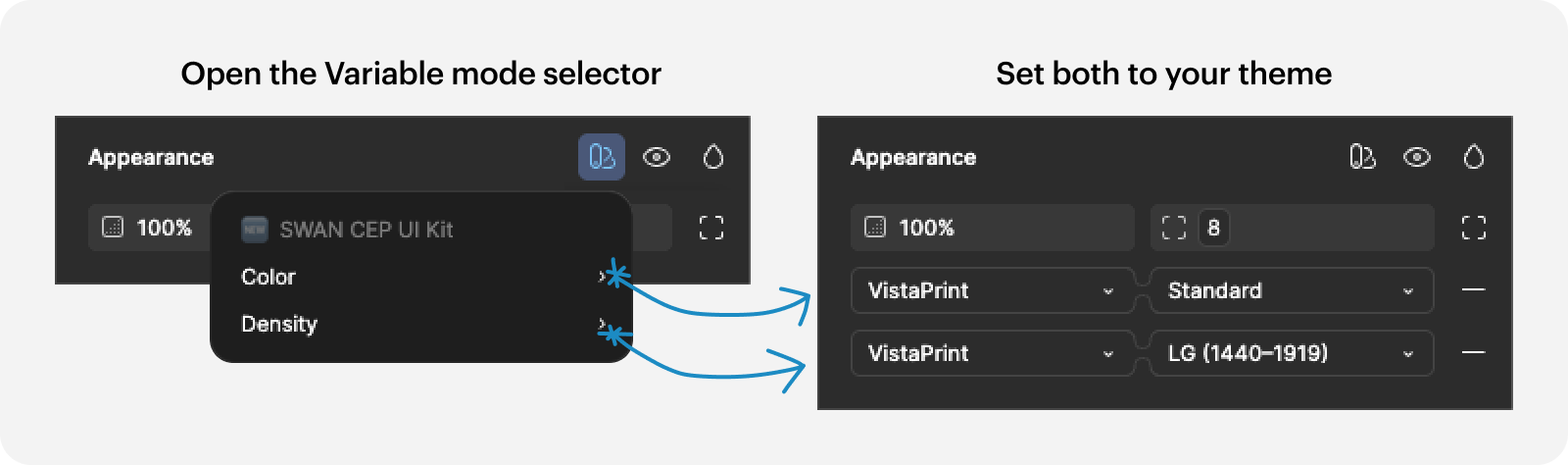
Themes are available as different variable collections in the SWAN UI Kit in Figma. When switching themes, you need to set it on both the Color and Density collections.