<iframe src="https://www.googletagmanager.com/ns.html?id=GTM-5HGSQD2L" height="0" width="0" style="display:none;visibility:hidden" title="GTM"></iframe>

Codemods

Overview

What is a codemod?

A codemod is a script that replaces the need for manually performing code changes. To make both major and minor upgrades easier, we offer codemods to automate as many of the manual code changes as possible.


When do I run codemods?

Technically, you are only required to make code changes when migrating to a major release, because a minor release will never introduce a breaking change that involves code changes.

However, we encourage you to run codemods during minor migrations, too! This is because we often deprecate features in minor releases to prepare for their removal in the next major release. By addressing these deprecations in your minor migrations, you’re setting yourself up for a much easier major migration later!


Which codemods do I run?

The codemods released with major versions are breaking - they can safely run only once. Run them ONLY when migrating from the previous major version.

The codemods released with minor versions are idempotent - they can be safely run more than once. Run them when your codebase is greater than or equal to its version, and less than the next major.


How to run codemods

Installation

To run the codemods, you will use the SWAN CLI, a unified tool for managing your SWAN package directly from your codebase using the command line.

The SWAN CLI is an NPX tool, so there is no need to install the package or its dependencies. However, it is required that you run the CLI using Node 18+.


Usage

You can simply run npx @vp/swan-cli@latest [command] [options] from the root of your codebase to invoke the latest and greatest version of the tool. Replace [command] and [options] with any of the flags below to customize your experience.


Commands

--run

Runs the codemod CLI, allowing you to select the directory to execute against, and which codemods to execute.

npx @vp/swan-cli@latest run


Running legacy codemods

If you need to run codemods from an older SWAN major version, you can explicitly specify the version of @vp/swan-cli to use:

npx @vp/swan-cli@<version> run

For example:

npx @vp/swan-cli@2.0.0 run

Use the version that contains the legacy codemods you need to run.


Options (optional):

--from

The minimum version, inclusive, to include in the preselection for codemods to execute. Codemods greater than or equal to the from version within the same major version will be run.

npx @vp/swan-cli@latest run --from=3.0.0 — runs all 3.x codemods


--to

The maximum version, inclusive, to include in the preselection for codemods to execute. Codemods less than or equal to the to version within the same major version will be run, unless a different major version is provided via the --from option.

npx @vp/swan-cli@latest run --to=3.0.0

You can combine --from and --to to select a version range:

npx @vp/swan-cli@latest run --from=3.0.0 --to=3.2.0


--list

Lists the codemods without executing them.

npx @vp/swan-cli@latest run --list

Respects the `--from` and `--to` flag for displaying matching codemods.

npx @vp/swan-cli@latest run --list --from=3.0.0 --to=3.2.0


--verbose

When used with the `run` command, logs information about each file the transformations were run against.

npx @vp/swan-cli@latest run --verbose

When used with the `--list` option, logs all the transformations to be executed by the codemod.

npx @vp/swan-cli@latest run --list --verbose


--help, -h

When used with a command, displays help for that command.

npx @vp/swan-cli@latest run --help

When used on its own, lists available commands.

npx @vp/swan-cli@latest --help


Next steps

Once the codemods are done executing, you will see the results printed to your terminal along with some disclaimers and next steps.
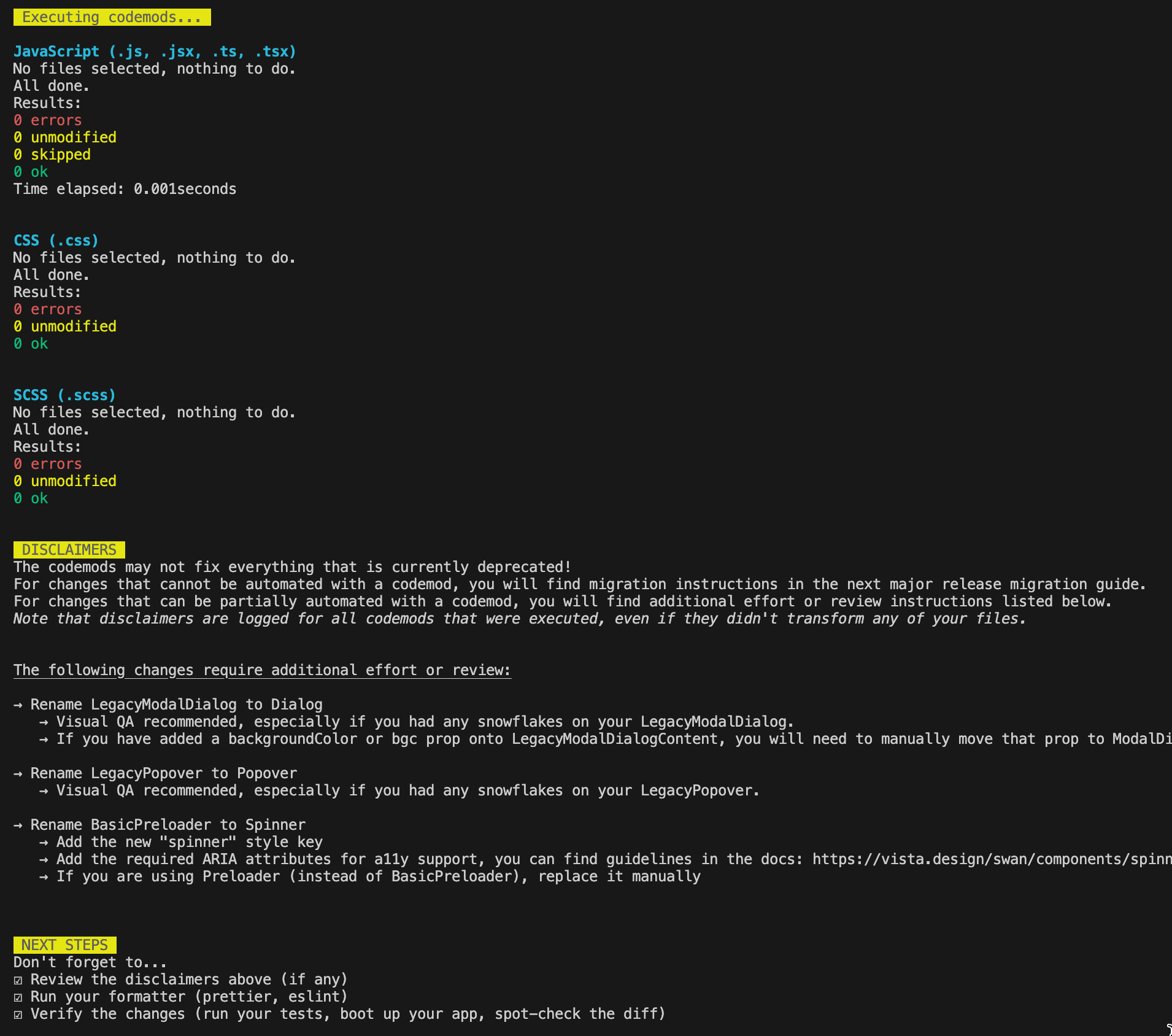
A screenshot of the CLI terminal output, including results, disclaimers, and next steps.

An example of the CLI terminal output including results, disclaimers, and next steps.

An example of the CLI terminal output including results, disclaimers, and next steps.

A screenshot of the CLI terminal output, including results, disclaimers, and next steps.

Review the disclaimers

The codemods may not fix everything that is currently deprecated. For changes that cannot be automated with a codemod, you will find migration instructions in the next major release migration guide. For changes that can be partially automated with a codemod, you will find additional effort or review instructions listed in the "Disclaimers" section of the output. Note that disclaimers are logged for all codemods that were executed, even if they didn't transform any of your files.


Run your formatter

Be sure to run your own formatter (i.e. prettier, eslint). The codemod library we use will apply its own formatting against your transformed files, and they will be ugly 🙂


Verify the changes

Verify that the changes made by the codemods are accurate, extensive, and produced zero regressions by running your test suite, booting up your application, performing visual QA, and spot-checking the diff. Keep in mind that the codemod library cannot anticipate every use case, so look closely for things it may have missed!

List of codemods

Here is an up-to-date list of all available codemods and their disclaimers, grouped by their minimum compatible SWAN version.

3.40.0

  • Remove style key spinner

3.39.0

  • Rename size prop value from super to large for ColorSwatches component

3.37.0

  • Rename iconType values for Icon component (moreHorizontal -> more, heart -> favorite)
    • ⚠️ After applying the codemod, verify that the replacement icon semantically matches the usage.
    • ⚠️ This codemod does not cover getSwanAssetUrl usage. Manually update any calls using these icon names.
  • Remove fullBleed prop from Accordion, Collapsible, BasicCollapsible components

3.36.0

  • Migrate tokens to getTokenCssVar

3.35.0

  • Remove floatingContainer and floatingContainerAlignment props from Column component
    • ⚠️ Removal of the floatingContainer prop can affect before/after visuals.
    • ⚠️ After applying the codemod, perform a visual QA to confirm layout and behavior remain correct.
  • Migrate tokens for CEP/Theming

3.31.0

  • Rename size prop value from mini to small for Avatar component
  • Remove labelPosition prop from ColorSwatches and ColorSwatch component

3.29.0

  • Rename selected-accent tokens to selected-blue

3.27.0

  • Rename component prop to as on all components

3.24.0

  • Remove disabled prop from PaginationStep component
  • Remove disabled prop from TabHeader component

3.22.0

  • Replace icon-only Button component with IconButton component
    • ⚠️ Update or verify the accessible text in the required tooltip prop (and optional aria-label if used). Refer to the Tooltip guidelines.
    • ⚠️ If you are using unstyled, full-width, mini, or non-rounded Buttons, replace them manually.

3.16.0

  • Remove dialog prop from PopoverContent component

3.14.0

  • Replace ComboboxWithFloatingLabel, DropdownWithFloatingLabel, ListboxWithFloatingLabel and TextInputWithFloatingLabel (and their types, sub-components and their types) with InputWithFloatingLabel (and sub-component and type).
    • ⚠️ Codemod will not include the fullWith prop if it already exists on the Dropdown or Listbox component with a different value than the prop on DropdownWithFloatingLabel or ListboxWithFloatingLabel. Please migrate it manually
  • Remove gridGuttersVariant prop from Carousel component.
  • Remove gutter prop from GridContainer component.

3.10.1

  • Rename visuallyHiddenLabel prop to accessibleText for AlertBoxDismissButton component
    • ⚠️ This codemod renames visuallyHiddenLabel to accessibleText but retains the existing value, so if you used a React node, you'll need to update it to a string afterwards.
  • Rename visuallyHiddenLabel prop to accessibleText for ModalDialogCloseButton component
    • ⚠️ This codemod renames visuallyHiddenLabel to accessibleText but retains the existing value, so if you used a React node, you'll need to update it to a string afterwards.
  • Rename visuallyHiddenLabel prop to accessibleText for ZoomControlsIn and ZoomControlsOut components
    • ⚠️ This codemod renames visuallyHiddenLabel to accessibleText but retains the existing value, so if you used a React node, you'll need to update it to a string afterwards.
  • Rename visuallyHiddenLabel prop to accessibleText for ZoomControlsValue component
    • ⚠️ This codemod renames visuallyHiddenLabel to accessibleText but retains the existing value, so if you used a React node, you'll need to update it to a string afterwards.

3.8.0

  • Remove skin prop from FormLabel component
  • Remove skin prop from StandardForm component

3.7.0

  • Move imageFocalPoint prop from Banner to BannerImage component
    • ⚠️ Codemod will not run if the imageFocalPoint prop already exists on the BannerImage component with a different value than the prop on Banner. Please migrate it manually.

3.5.0

  • Remove style keys button, fieldSet, icon, pricing

3.3.0

  • Remove size prop from the Button component
  • Remove size prop from Callout component
  • Remove size prop from Dropdown component
  • Remove size prop from Listbox component
  • Remove size prop from TextInput component
  • Remove size prop from ToggleSwitch component
  • Rename iconType prop values for Icon component (closeLarge -> close, closeSmall -> close, toggleOff -> cross, plusRounded -> add, satisfaction -> guaranteedSatisfaction, caretRight -> chevronRight, login -> arrowRight, uploadYourArtwork -> upload, searchLarge -> search, clock -> orderHistory, myProjects_1 -> myProjects, polish -> sparkle, deleteStudio -> delete, playRounded -> play, chatReview -> liveChat, phoneCall -> phone, help -> phone, checkRoundedEdges -> check, checkRoundedEdgesMini -> check, heartEmpty -> heart, heartFilled -> heart, starEmpty -> star, starFilled -> star)
  • Rename size prop values for Icon component (10p -> 16p, 28p -> standard, 32p -> standard, 40p -> standard, 48p -> standard, 60p -> standard)
  • Rename swan-icon-size-1em, swan-icon-size-1rem classes to swan-icon-size-standard
  • Rename size prop values for Spinner component (mini -> standard, tiny -> standard)
  • Remove wrapHeaders prop from Tabs component
  • Rename skin prop values for Callout component (foil -> info, new/announcement -> accent, discount -> promo, standard -> info)
  • Remove border prop from Callout component
  • Replace variant="overlay" prop with emphasis="low" and remove variant prop from Callout component
  • Rename skin prop value from line to standard for Dropdown component
  • Remove width prop from AlertBox component
  • Rename skin prop values for AlertBox component (standard -> info, positive -> success)
  • Remove textHorizontalAlignOnExtraSmall prop from Banner component
  • Rename iconType prop value from email to mail for Icon component


3.0.0

  • Migrate margin*/m*, padding*/p* prop values (1 -> 2, 2 -> 3, 3 -> 4, 4 -> 5, 5 -> 6, 6 -> 7, 13 -> 12)
    • ⚠️ This codemod can only be run ONCE to migrate space props from SWAN v2 to v3.
  • Migrate fontFamily prop values (graphik -> primary, secondary -> primary, special -> secondary)
  • Migrate import paths for mixins to @vp/swan/mixins/*
  • Remove skin prop from ThumbnailsHero component
  • Rename prop names for Typography component (align -> textAlign, weight -> fontWeight)
  • Rename constants and import paths for tokens (dtcgTokens -> tokens)
  • Remove style keys (controlIcon, detailsBanner, embeddedTextHero, promoBar, secondaryTile, standardBanner, standardHero, combobox, menu, legacy*)
  • Remove skin prop from Table component
  • Rename type StyleSpacing0to13 to StyleSpaceWithAuto